Electronic devices with wireless features must follow Indonesia’s telecommunications rules. Before companies sell these products, they may need Postel Certification, also known as SDPPI or DJID Certification.
Indonesia’s Ministry of Communication and Digital Affairs issues this certification through the Directorate General of Digital Infrastructure.
Postel Certification shows that a device meets the required technical standards. Therefore, manufacturers and importers should check a product’s status before selling it in Indonesia.
But how can you check whether a device has valid Postel Certification?
In this guide, you will learn how to check Postel Certification online. You will also learn which details to review and how to solve common verification problems.
What Is Postel Certification?
Postel Certification is an approval for certain telecommunications devices in Indonesia.
It checks whether a device meets the required technical standards. These standards cover radio frequency, electromagnetic compatibility, and other technical aspects.
For example, the following products may need Postel Certification:
-
Smartphones and mobile phones.
-
Wi-Fi routers and wireless modems.
-
Bluetooth speakers and headphones.
-
Wireless CCTV cameras.
-
Smartwatches with wireless features.
-
Walkie-talkies and radio devices.
-
Wireless keyboards and computer accessories.
-
Internet of Things (IoT) devices.
However, not every electronic product needs this certification. The requirements depend on the product type and its technical features.
For this reason, businesses should check the rules before importing or selling their products.
Why Should You Check Postel Certification?
Checking Postel Certification helps businesses confirm a product’s approval status.
There are four main reasons to check this information.
1. Ensure Regulatory Compliance
First, businesses must follow Indonesia’s telecommunications rules.
The official database helps companies check whether a device has an issued certificate. As a result, they can identify possible compliance issues before selling the product.
2. Verify Product Information
The official database also provides important product details.
For instance, users can check the brand, model, certificate number, and certificate holder. These details help companies confirm that the certificate belongs to the correct product.
3. Reduce Import Risks
Importers should check certification before shipping their products.
This step helps them find possible problems early. Therefore, they have more time to prepare the required documents and avoid delays during the import process.
4. Build Business Confidence
Valid certification records can increase trust among business partners and customers.
Moreover, they show that a company takes product safety and regulatory compliance seriously.
How to Check Postel Certification Online
The Indonesian government provides an official website for certificate verification.
You can follow these five simple steps to check a product.
Step 1: Visit the Official Website
First, open the official e-Sertifikasi website.
Website: https://sertifikasi.postel.go.id/
The Directorate General of Digital Infrastructure manages this platform. It provides access to information about issued telecommunications certificates.
Step 2: Open the Issued Certificates Section
Next, find the Sertifikat Terbit (Issued Certificates) section.
This section shows certificates that the authority has issued. You can use the available search features to find a specific device.
Step 3: Search for Product Information
After opening the certificate list, enter the product details.
You can search using the following information:
-
Certificate Number.
-
Brand Name.
-
Device Name.
-
Model or Type.
-
Certificate Holder.
Make sure you enter the correct details. This will help you find the right certificate faster.
Step 4: Review the Certificate Details
Once you find a matching result, open the certificate information.
Then, check the following details:
-
Certificate Number.
-
Issued Date.
-
PLG ID.
-
Name of Applicant.
-
Device Name.
-
Brand.
-
Model.
-
Marketing Name.
-
Country of Origin.
These details help you identify the registered device and its certificate holder.
Step 5: Match the Product Information
Finally, compare the certificate details with the actual product.
Pay close attention to the brand and model number. This is important because two devices may have similar names but different technical features.
If the details do not match, check the information again. Do not assume that the certificate covers the product until you confirm it.
How to Check Postel Certification Using a QR Code
Besides the online database, you can also use the QR code on the product label.
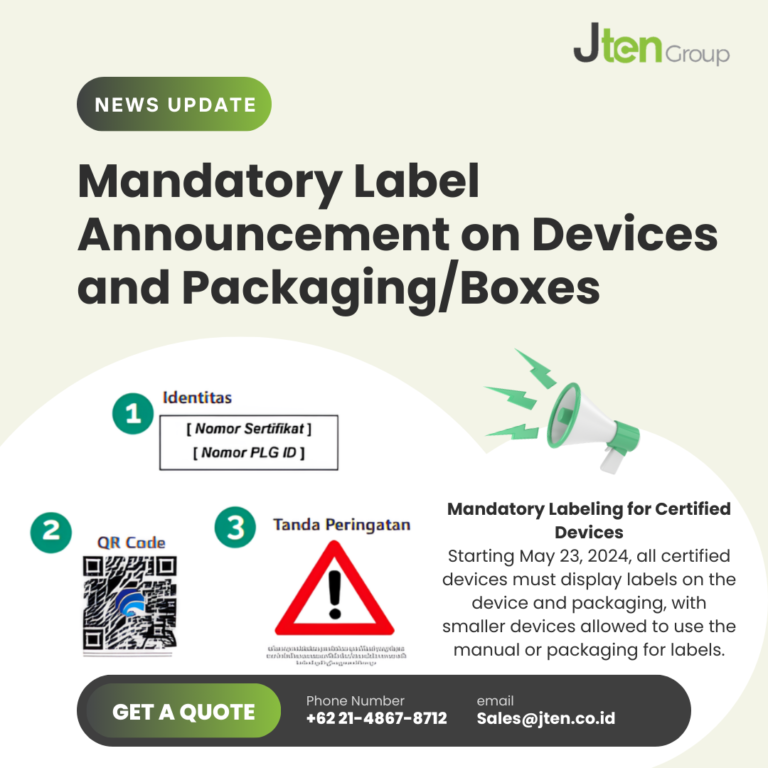
Minister of Communication and Informatics Regulation No. 3 of 2024 sets out labeling requirements for certified telecommunications equipment. These labels include the certificate number, PLG ID, QR code, and warning information.
The QR code can help users access important certification details, such as:
-
Certificate Number.
-
PLG ID.
-
Device Brand.
-
Device Type.
-
Other relevant certificate information.
To check these details, simply scan the QR code with your smartphone.
After scanning, review the information on your screen. Then, compare it with the product label and certificate record.
This method gives users another way to check product information. However, you should still compare the details with the official database.
Important Information to Check on a Postel Certificate
Do not check the certificate number alone. You should also review other important details.
The following table explains what you need to check.
| Information | What to Verify |
|---|---|
| Certificate Number | Make sure it appears in the official database. |
| Certificate Holder | Check the registered company or applicant. |
| Brand | Confirm that the brand matches the product. |
| Model or Type | Compare the model with the certificate record. |
| Device Name | Check the equipment description. |
| Issued Date | Review the date of issue. |
| PLG ID | Check the certificate holder’s identification number. |
By checking all these details, you can avoid confusion between different products and certificate records.
Common Problems When Checking Postel Certification
Sometimes, users may face problems when they search for certification information.
Here are four common issues and some ways to handle them.
1. Certificate Number Cannot Be Found
Sometimes, the certificate number does not appear in the search results.
This may happen because of a typing error or incorrect information. In some cases, the search terms may not match the database record.
First, check the certificate number again. If you still cannot find it, try searching by brand or model.
2. Brand or Model Does Not Match
A product may have the same brand as a registered device but a different model number.
Therefore, you should always compare the exact model with the official record. Do not assume that one certificate covers every product under the same brand.
3. Different Certificate Holder
The certificate holder may not be the same company as the manufacturer or overseas supplier.
In this situation, review the certificate details carefully. You should also ask for proof of authorization or a business relationship when necessary.
4. QR Code Information Is Inconsistent
Sometimes, the QR code may show details that differ from the product label.
If this happens, compare the information with the official certificate database. You should also contact the relevant authority if you cannot confirm the certificate’s validity.
What Should Importers Do If a Product Does Not Have Postel Certification?
If a product needs Postel Certification but does not have it, importers should prepare the required documents first.
They should also check the technical rules that apply to the product.
Here are the main steps to follow:
-
Identify the product category. Check which telecommunications rules apply to the device.
-
Prepare technical documents. Collect the product specifications and user manual.
-
Contact the manufacturer. Ask for the technical information needed for certification.
-
Arrange product testing. Use an appropriately recognized testing laboratory when required.
-
Submit the application. Apply through the official certification system.
-
Complete the requirements. Make sure the product meets the applicable rules before distribution.
By following these steps, importers can prepare their products more effectively. In addition, early preparation can help reduce compliance problems and avoid unnecessary delays.
Conclusion
Checking Postel Certification is an important step for businesses that sell electronic devices in Indonesia.
The official e-Sertifikasi website allows users to check certificate numbers, brands, models, and other product details. In addition, users can scan the QR code on the product label for further verification.
Therefore, manufacturers and importers should always check certification before selling or distributing regulated devices.
This simple step helps businesses reduce compliance risks and enter the Indonesian market with greater confidence.